
Open source · Open format
Hear every word.
See every word.
ai1y, say it “Ally”, reads your books aloud and lights up each word as it’s spoken, so your eyes and ears stay on the same word. The text never leaves the page.
Live demo, built with ai1y
Meet Ally
Hi, I’m Ally, and I’d love to read books with you.
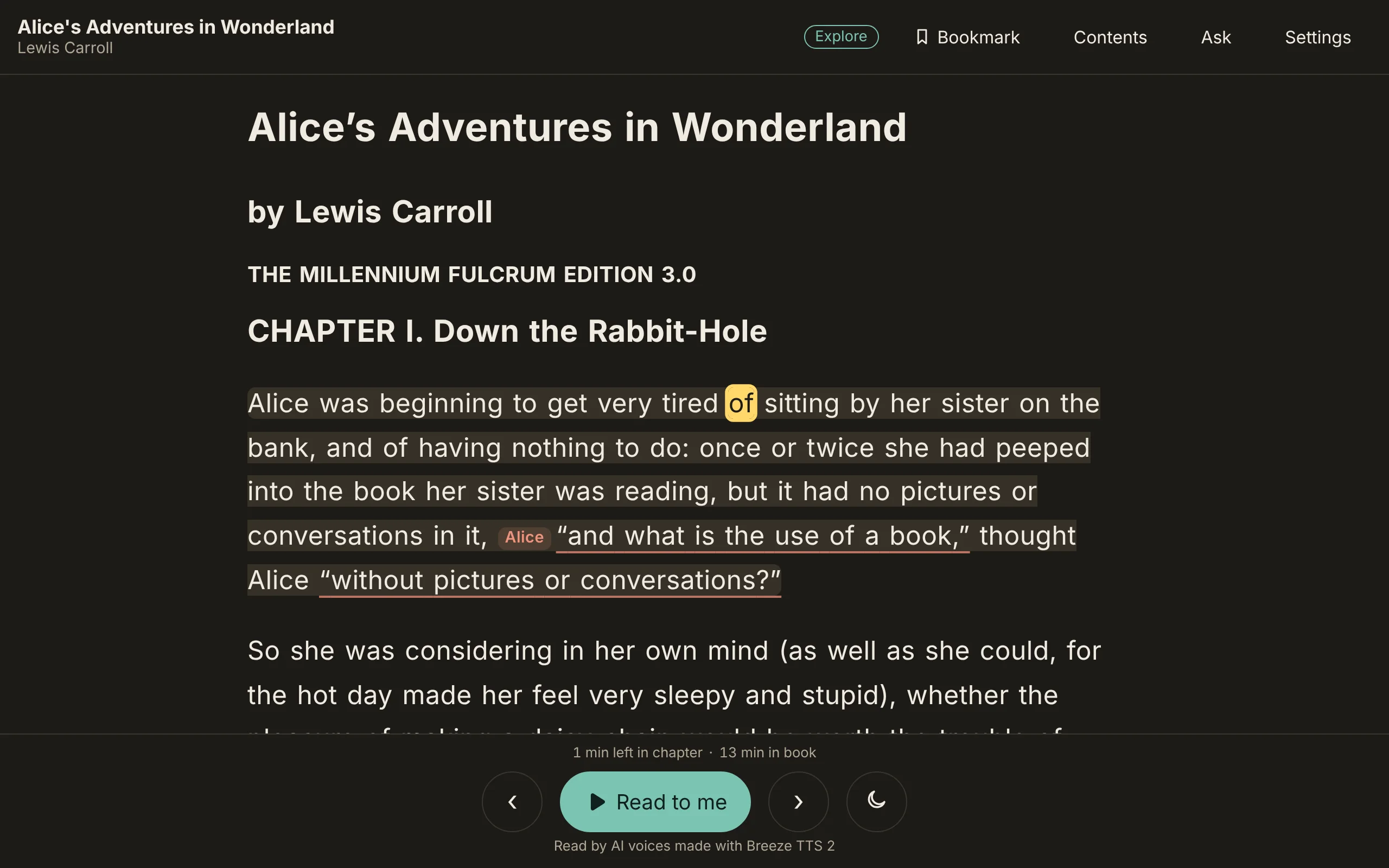
As I read aloud, each word lights up when I say it, so your eyes and ears can follow along together, just like on this page right now.
If a word is tricky, tap it to hear it, and you can slow me down whenever you like.
Whether you’re learning to read or learning astrophysics, I’m here to help. The words always stay on the page, so you can listen, follow along, or read on your own, whenever you’re ready.
Soon, I’ll also explain the pictures, formulas, and code in a book, read you the footnotes, help you practice the sounds inside words, and answer your questions about what you’re reading.
Ally is open source, and the way I keep a book, with its words, its voice, and the timing of every word, is an open format that anyone can use. It supports EPUB, the standard e-book format, and your books stay on your device, so they work even when you’re offline.
So pick a book you love, press play, and let’s read it together.
Turn on JavaScript to hear Ally read this with each word lighting up.
ai1y-build. Voice: an AI voice made with Breeze TTS 2, used under its non-commercial license. Word timing: Whisper.See it
The reader and the studio, as they are today
Words light up as a book is read, on a laptop or a phone. The creator studio puts every voice, sound effect and background on a Timeline, and lets you fix a sentence right where you hear it.


How it works
From any book to a read-along in three steps
-
Bring a book
Start from an EPUB, including thousands of public-domain classics from Project Gutenberg.
-
Narrate and time it
A natural voice reads each sentence, and a speech model checks the reading and times every single word.
-
Read along anywhere
Open it in the reader on a phone, tablet or laptop. Save it once and it works with no network.
Inside the build
The book factory
Here’s what happens between an EPUB going in and a read-along coming out. Every station is a real step, in the order it runs: ai1y-build makes the book, and ai1y-yoto can press it onto a card.
-
Loading dock
An EPUB comes in. Its chapters, pictures and alt text are unpacked, the printed contents page is left out, and front matter like the copyright page is marked so it isn’t read aloud unless you ask.
-
Sentence cutter
The text is cut into sentences. Each one gets an ID made from its own words and a pointer back to its exact place in the EPUB.
-
Summary bench
Optional
AI writes short summaries of pictures, charts, code, tables and long formulas, each labeled as written by AI. They stay off in the reader until you turn them on.
-
Casting desk
Optional
AI suggests who says each line of dialogue. Lines it isn’t sure about stay with the narrator, and the cast list can be edited before anything is recorded.
-
Recording booth
A natural voice reads each sentence aloud, as the narrator or as a character’s own voice. Today that voice is Breeze TTS 2, and the engine can be swapped for another.
-
Listening check
A speech model listens to every recording and times each word. If it hears different words, or a character’s voice drifts, the sentence is read again.
-
Mixing desk
Optional
The studio’s timeline gives each voice, the sound effects and each background a lane of its own. Drag a background from one sentence to another, set its level and fades, and play the chapter as mixed, muting or soloing any lane. The reader plays the background as made, softer or off.
-
Sound timer
Optional
Each word is broken into its letter sounds, and each sound gets its own time, ready for the sounds practice that’s coming next. Words that fail a check are left for a person to review.
-
Packing line
Everything is packed into an ai1y book: a manifest plus small files for the text, the timings and the audio, each named by its hash so a device can check it. Then it’s ready to read.
-
Card press
Optional
A narrated book can also go on a Yoto Make Your Own card.* Each chapter becomes an audio track with its own little pixel icon, sent to your Yoto account as a playlist. The card plays the narration, and the highlighting and taps stay in the reader.
Today
What Ally does now
-
Words light up as they’re read
Every word carries its own timing, so the highlight is exact, never a guess.
-
Tap any word to read from there
Step a sentence at a time, keep a bookmark, and see how long is left.
-
Make the page yours
Bigger text, wider spacing, your font, a slower voice, and light or dark.
-
Summaries of pictures, code and tables
Short spoken summaries, labeled as written by AI, off until you choose them.
-
Talk to your book
Ask a question out loud and hear the answer from the book, then ask the next one.
-
Your books stay on your device
Every file is checked by its hash. Asking goes online with only what it needs.
-
A voice for each character
AI suggests who says each line. You pick each voice, or record your own.
-
Show how a line goes
Tell a line how to be said, or read it aloud yourself and the voice follows.
-
Fix it where you hear it
Listen to the finished book and fix any sentence right there, even on a phone.
-
Sound effects and backgrounds
A real sneeze for “Kertyschoo!”, or rain under the voice, on a track of its own.
-
A library of real books
Read-alongs built from EPUBs, pictures and alt text kept, on a shelf of your own.
-
Works with Yoto
Put a narrated book on a Yoto Make Your Own card, one track per chapter.*
Why
More than an audiobook, and never instead of the book
An audiobook takes the page away. Ally keeps the page and the voice together.
Hearing a book while seeing it can help attention stay on the page, carry a reader through harder text, and build vocabulary. So the words never leave the screen, each spoken word is tied to the written one, and the reader decides when to listen, follow along or read alone.
It’s built for many kinds of readers and many kinds of access, and for anyone who simply loves listening to a good book. And it’s growing to reach the books audiobooks rarely cover, like a physics textbook full of pictures, formulas and footnotes.
For builders
An open read-along format
An ai1y book is a folder of plain files: the text, split into sentences that point back to the original EPUB, PDF or web page; one or more narrations with the timing of every word; and a pronunciation list. Every file is named in the manifest by its hash, so a device can trust it and cache it forever.
It isn’t an EPUB itself, but it’s modeled on EPUB 3 Media Overlays, the standard e-book readers use for read-along books, and it keeps the same timing data, so a book built from an EPUB could be turned back into a read-aloud EPUB. The format is open, so you’re never locked in, and support for more formats than EPUB is planned. An overlay book carries only timings and hashes, no text or audio, so a family can bring their own copy of a book.
Specification: CC BY 4.0. Format and reader code: Apache 2.0, in Python and Rust, with the Rust core also running in the browser. Tools: Functional Source License.
Read about the formatThis page’s demo, as files
manifest.jsontitle, parts, and every file’s hashcontent/part-001.jsonthe text, sentence by sentencerenditions/r1/rendition.jsonwhich voice, which modelrenditions/r1/part-001.jsonwhen each word starts and endsrenditions/r1/audio/part-001.m4athe narration
Coming next
What we’re building
- In progress
Footnotes and originals
Footnotes read where they belong, and each summary opens in place to show the picture, code or table it describes.
- In progress
Sounds and practice
Hold a word to see and hear the sounds inside it, and practice them.
- Later
More formats than EPUB
More kinds of books in, and the same open format out, so nothing you make is locked to one app.
Try it
Read a book now
Ally is in early development. Open the reader, pick a book and press Read to me: there’s nothing to install. The tour shows the reader and the creator studio, and the documentation covers reading, making your own books and the format. Questions and feedback are welcome at support@ai1y.co.